Say goodbye to discomfort and hello to a pleasurable audio journey. Whether a music enthusiast or podcast lover, discover how to enjoy your favorite content without discomfort.
In a world filled with captivating sounds and immersive audio experiences, the comfort of wearing headphones and earbuds can make all the difference. Whether you're a music lover, a podcast enthusiast, or someone who enjoys the pleasure of crystal-clear sound, how you wear your headphones and earbuds can enhance or detract from your audio journey.
This guide will delve into the art of wearing headphones and earbuds comfortably. We'll provide expert tips and tricks, ensuring your listening experience becomes a seamless and pleasurable part of your daily life. Read on!
Table Of Contents
Ways You Can Wear Wired Earbuds
1. Straight Down
This method allows the earbud cables to hang straight from your ears. To Wear:
Begin by holding the earbuds with one hand, with the ear tips pointing towards your ears.
Insert the ear tips gently into your ear canals. Ensure they fit comfortably and snugly.
Let the cables hang straight down naturally from your ears, leading to your device (such as a smartphone or music player).
Pros
Quick and effortless to put on and take off.
Suitable for casual listening and situations where you need to remain aware of your surroundings.
Cons
Earbud cables are prone to tangling, which can be frustrating.
The weight of the cable may occasionally pull on the earbuds, leading to discomfort during prolonged use.
2. Over-the-Ear/Around-the-Ear
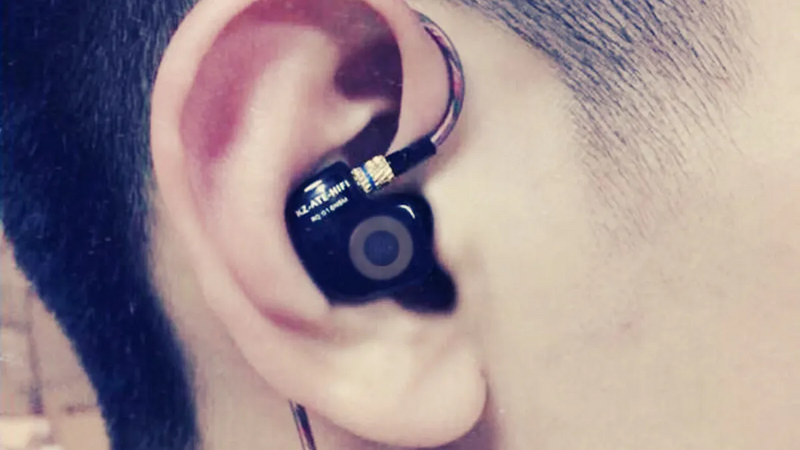
This method involves routing the cable over the back of your ears before inserting the earbuds into your ear canals. To Wear:
Hold the earbuds with one hand, ensuring the ear tips point towards your ears.
Gently guide the cable over the top of your ears, creating a secure loop behind your earlobes.
Insert the ear tips into your ear canals, ensuring they fit comfortably and securely.
Pros
It provides a secure and stable fit, ideal for physical activities or when you're on the move.
Minimizes cable tangling since the cable is kept out of the way.
Reduces strain on the earbuds' cable connections, potentially extending their lifespan.
Cons
It takes more time to put on compared to the straight-down method.
Some people may find it less comfortable for extended wear if the earbuds are designed for something other than this specific style.
The over-the-ear/around-the-ear method offers a secure fit, making it popular among athletes and those who value stability during their activities. Choose the style that suits your comfort preferences and the specific situations in which you'll use your wired earbuds.
How to Wear On-Ear Headphones Correctly?
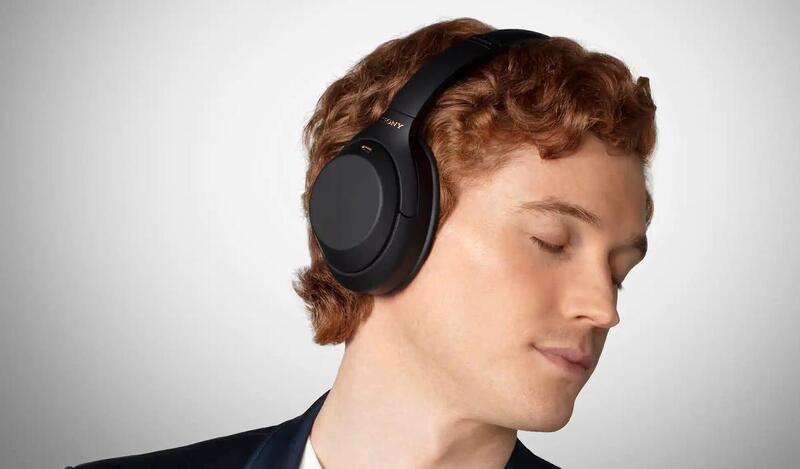
Wearing on-ear headphones correctly ensures comfort, audio quality, and a secure fit. Follow these steps to wear on-ear headphones properly:
Position the Headphones: Hold the headphones with both hands, placing one ear cup on each ear. Ensure the headband is centered on the top of your head.
Adjust Headband Size: Most on-ear headphones have an adjustable headband. Extend or retract the headband to fit your head comfortably. The ear cushions should sit securely on your ears without excessive pressure.
Align Ear Cups: Position the ear cups to align directly with your ears. The cushions should fully cover your ears, creating a seal for optimal sound quality and noise isolation.
Secure the Headband: Ensure the headband sits flat on your head, with the cushioned padding resting comfortably on the top of your skull. Adjust the headband tension for a snug but not overly tight fit.
Cable Placement: If your headphones have a detachable cable, connect it securely to the ear cups. Keep the cable behind your neck or to one side, depending on your preference.
Test the Fit: Once you've positioned the headphones, test the fit by gently pressing the ear cups to ensure they seal properly around your ears. You should feel comfortable with pressure but not discomfort.
Adjust for Comfort: If you experience discomfort or pressure points, adjust the headband or ear cups as needed. Properly adjusted on-ear headphones should provide a secure fit without causing discomfort, even during extended listening sessions.
Listen at a Safe Volume: Keep the volume safe to protect your hearing when listening to music or audio. Most on-ear headphones deliver excellent sound quality, but excessive volume can damage your ears.
These steps ensure a comfortable and secure fit for your on-ear headphones, allowing you to enjoy your audio content to the fullest while minimizing discomfort and potential hearing damage.
Tips to Enhance Your Experience with On-ear Headphones
Here are the main tips for getting the most out of your on-ear headphones:
Proper Fit and Comfort
Ensure your on-ear headphones fit comfortably. Adjust the headband and ear cup placement to minimize discomfort during extended use. A good fit should provide a secure seal without causing pressure points on your head or ears.
Cleanliness and Maintenance
Regularly clean your headphones, especially the ear cushions, to maintain hygiene and comfort. Dirty ear cushions can be uncomfortable and affect sound quality. Use a damp cloth to wipe them down as needed.
Mind Your Volume
Listening at excessively high volumes can damage your hearing. Keep the volume at a safe and comfortable level. Many devices have volume-limiting features you can enable to protect your ears.
Storage and Protection
Invest in a headphone case or stand to store your on-ear headphones properly when not in use. This helps prevent cable tangling and protects your headphones from damage.
Consider Noise Isolation and Noise Cancellation
If you often listen in noisy environments or during travel, consider on-ear headphones with noise isolation or noise-canceling features. These technologies reduce background noise, allowing you to enjoy your audio content without increasing the volume.
These tips focus on comfort, hygiene, hearing protection, headphone care, and optimizing your listening experience in various settings. By following them, you'll ensure that your on-ear headphones continue to provide excellent sound quality and comfort throughout their lifespan.
Elevate Your Listening Experience Today
On-ear headphones can provide an exceptional audio experience when used correctly and carefully. By following the tips for proper fit and comfort, cleanliness and maintenance, volume control, storage, and noise isolation or cancellation features, you can maximize the longevity and enjoyment of your headphones. Whether you use them for leisure, work, travel, or exercise, these guidelines ensure that your on-ear headphones remain reliable for your audio needs while safeguarding your hearing health.
Useful places to investigate quiet headphones include: a software volume/mixer setting, a phone's built-in headphone safety limiter, a loose or dirty p...
If sound is only coming from one side, the fastest useful check is this: test the headphones with another device, make sure left-right balance is centered, t...
Usually no: a PS4 can detect Bluetooth devices, but standard third-party Bluetooth headphones are generally not supported for direct game audio. PlayStation&...
Best Buy's current U.S. policy gives standard customers 15 days to return most headphones, while My Best Buy Plus and My Best Buy Total members general...
Quick answer: Most Amazon headphone orders still follow Amazon's standard return framework in 2026: if the order is eligible and the item is in origina...
Do you want to elevate your audio experience with superior sound quality, stylish design headphones, and seamless performance? Here comes the Urbanears Hea...